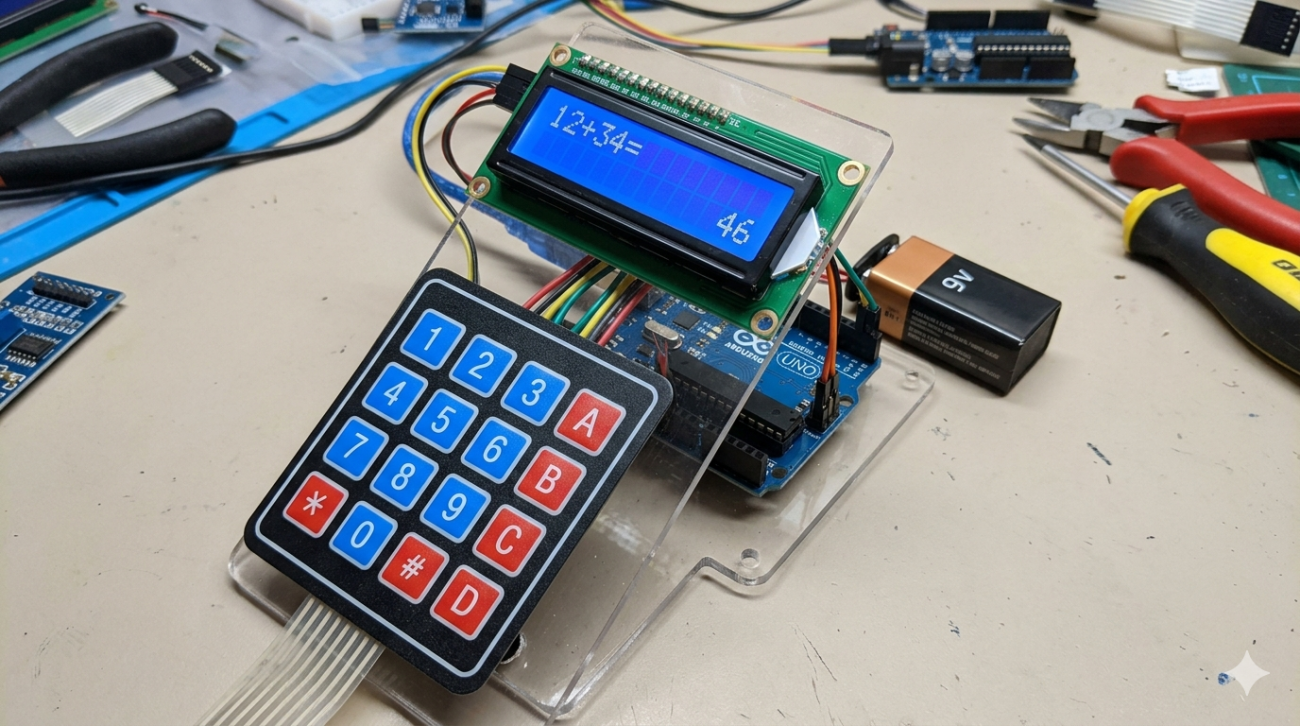
สร้างเครื่องคิดเลขพกพาด้วย Arduino และ Membrane Keypad (จอ LCD I2C)
เปลี่ยน Arduino ให้เป็นเครื่องคิดเลขพื้นฐานที่ใช้งานได้จริง! โปรเจกต์นี้จะสอนการรับค่าจากคีย์บอร์ดแบบเมมเบรน ประมวลผลสมการคณิตศาสตร์ และแสดงผลทางหน้าจอ LCD โดยรองรับการคำนวณตามลำดับความสำคัญของเครื่องหมาย (Order of Precedence) อีกด้วย
🛠 อุปกรณ์ที่ต้องใช้
- Arduino Uno Rev3 x 1 เครื่อง
- Membrane Keypad (4×4) x 1 อัน
- จอ I2C LCD Display (16×2) x 1 จอ
- สายจัมเปอร์ (Male to Female) x 4 เส้น
- สายจัมเปอร์ (Male to Male) x 8 เส้น
🔌 การต่อวงจร (Wiring Diagram)
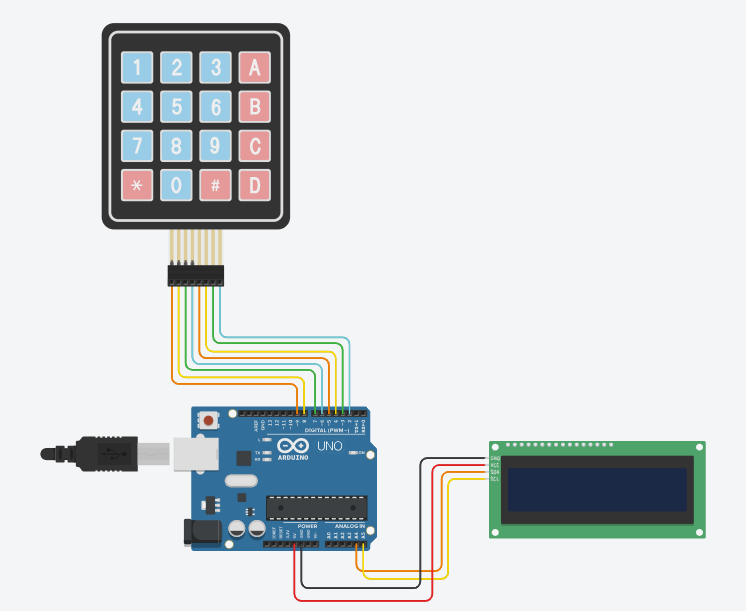
1. การเชื่อมต่อจอ LCD (I2C)
| LCD Pin | Arduino Pin |
|---|---|
| GND | GND |
| VCC | 5V |
| SDA | A4 |
| SCL | A5 |
2. การเชื่อมต่อ Keypad
| Keypad Pin | Arduino Pin |
|---|---|
| Pin 1 (Row 1) | D9 |
| Pin 2 (Row 2) | D8 |
| Pin 3 (Row 3) | D7 |
| Pin 4 (Row 4) | D6 |
| Pin 5 (Col 1) | D5 |
| Pin 6 (Col 2) | D4 |
| Pin 7 (Col 3) | D3 |
| Pin 8 (Col 4) | D2 |
⚠️ ข้อควรระวังในการใช้งาน:
เพื่อให้โค้ดทำงานถูกต้อง ให้เข้าใจตรงกันว่าปุ่มบน Keypad แทนค่าดังนี้:
– ปุ่ม A = บวก (+)
– ปุ่ม B = ลบ (-)
– ปุ่ม C = คูณ (x)
– ปุ่ม D = หาร (/)
– ปุ่ม # = เท่ากับ (=)
– ปุ่ม * = ล้างหน้าจอ (Clear)
🧠 หลักการทำงานของโปรเจกต์
- การรับค่า: เมื่อกดปุ่มตัวเลขหรือเครื่องหมาย ตัวอักษรเหล่านั้นจะถูกนำไปต่อกันเป็นข้อความ (String) เช่น “12+5”
- การแสดงผล: หน้าจอ LCD จะแสดงสมการที่เรากำลังพิมพ์แบบ Real-time
- การประมวลผล (เมื่อกดปุ่ม =):
- Arduino จะอ่านข้อความทั้งหมดแล้วแยกตัวเลขกับเครื่องหมายออกจากกัน
- คำนวณตามหลักคณิตศาสตร์: ทำคูณ (*) และหาร (/) ก่อนเสมอ
- จากนั้นจึงทำการบวก (+) และลบ (-)
- ความปลอดภัย: หากมีการหารด้วยศูนย์ ระบบจะแสดงผลเป็น 0 เพื่อป้องกันข้อผิดพลาด
💻 Arduino Code
คุณจำเป็นต้องติดตั้ง Library LiquidCrystal_I2C และ Keypad ในโปรแกรม Arduino IDE ก่อนทำการ Upload
#include <Wire.h>
#include <LiquidCrystal_I2C.h>
#include <Keypad.h>

// ตั้งค่าที่อยู่ I2C (ส่วนใหญ่คือ 0x27) และขนาดจอ 16x2
LiquidCrystal_I2C lcd(0x27, 16, 2);

// ตั้งค่า Keypad
const byte ROWS = 4;
const byte COLS = 4;
char keys[ROWS][COLS] = {
  {'1','2','3','+'},
  {'4','5','6','-'},
  {'7','8','9','*'},
  {'C','0','=','/'}
};

byte rowPins[ROWS] = {9, 8, 7, 6};
byte colPins[COLS] = {5, 4, 3, 2};

Keypad keypad = Keypad(makeKeymap(keys), rowPins, colPins, ROWS, COLS);

String expression = "";

void setup() {
  lcd.begin(16, 2, LCD_5x8DOTS);
  lcd.backlight();
  lcd.clear();
  lcd.print("Calculator Ready");
  delay(1500);
  lcd.clear();
}

void loop() {
  char key = keypad.getKey();

  if (key != NO_KEY) {
    if ((key >= '0' && key <= '9') || key == '+' || key == '-' || key == '*' || key == '/') {
      if (expression.length() < 16) {
        expression += key;
        lcd.setCursor(0, 0);
        lcd.print(expression);
      }
    } else if (key == '=') {
      float result = evaluateWithPrecedence(expression);
      lcd.setCursor(0, 1);
      lcd.print("= ");
      lcd.print(result);
      expression = ""; // ล้างค่าสมการหลังจากคำนวณเสร็จ
    } else if (key == 'C') {
      expression = "";
      lcd.clear();
    }
  }
}

// ฟังก์ชันคำนวณสมการตามลำดับความสำคัญของเครื่องหมาย
float evaluateWithPrecedence(String expr) {
  float numbers[10];
  char operators[10];
  int numIndex = 0, opIndex = 0;
  String temp = "";

  // แยกตัวเลขและเครื่องหมายออกจากสมการ
  for (int i = 0; i < expr.length(); i++) { char c = expr.charAt(i); if (c >= '0' && c <= '9') {
      temp += c;
    } else {
      numbers[numIndex++] = temp.toFloat();
      temp = "";
      operators[opIndex++] = c;
    }
  }
  numbers[numIndex] = temp.toFloat();

  // รอบที่ 1: จัดการการ คูณ (*) และ หาร (/) ก่อน
  for (int i = 0; i < opIndex; i++) {
    if (operators[i] == '*' || operators[i] == '/') {
      float a = numbers[i];
      float b = numbers[i+1];
      float result = (operators[i] == '*') ? a * b : (b != 0 ? a / b : 0);

      numbers[i] = result;
      for (int j = i + 1; j < numIndex; j++) {
        numbers[j] = numbers[j + 1];
      }
      for (int j = i; j < opIndex - 1; j++) {
        operators[j] = operators[j + 1];
      }
      numIndex--;
      opIndex--;
      i--;
    }
  }

  // รอบที่ 2: จัดการการ บวก (+) และ ลบ (-)
  float total = numbers[0];
  for (int i = 0; i < opIndex; i++) {
    if (operators[i] == '+') total += numbers[i + 1];
    else if (operators[i] == '-') total -= numbers[i + 1];
  }

  return total;
}
หวังว่าโปรเจกต์นี้จะช่วยให้คุณเข้าใจการทำงานของ Keypad และการจัดการข้อมูลสตริงใน Arduino มากขึ้นนะครับ! หากมีข้อสงสัยสามารถคอมเมนต์ถามได้เลย
