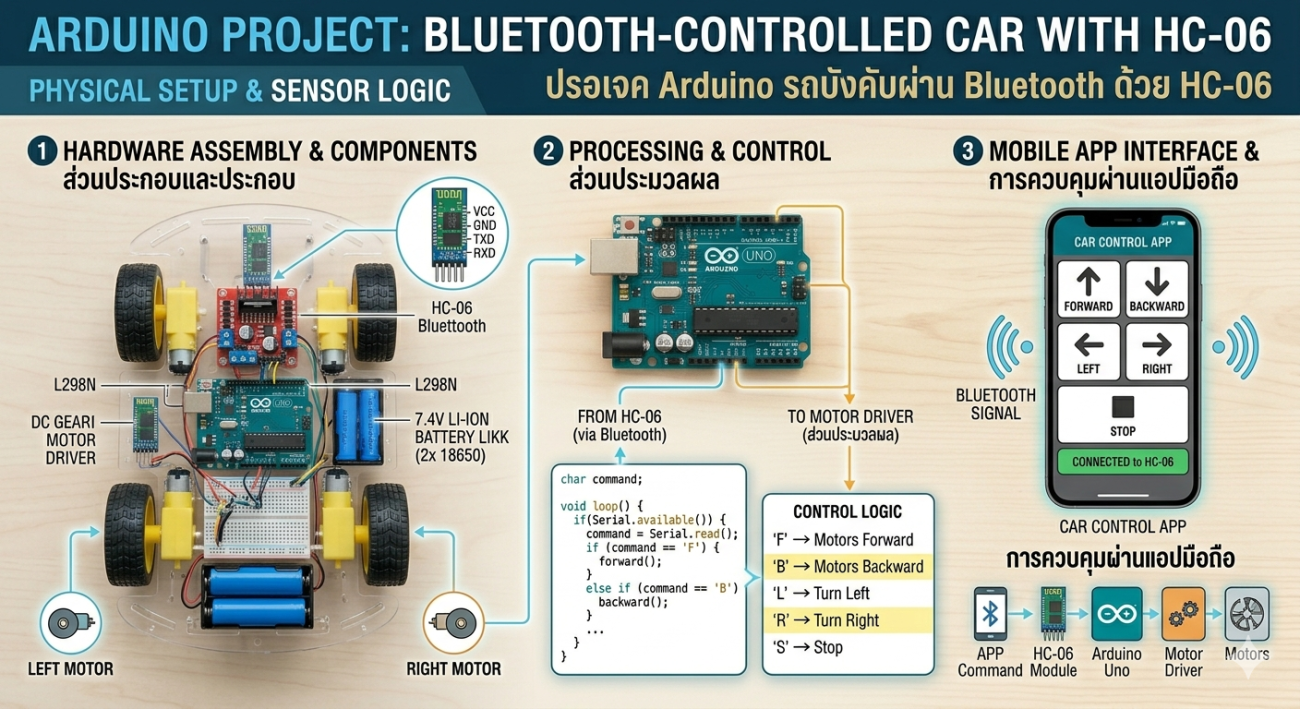
โปรเจค Arduino รถบังคับผ่าน Bluetooth ด้วย HC-06
โปรเจคนี้เป็นการสร้างรถบังคับไร้สายโดยใช้ Arduino และโมดูล Bluetooth HC-06
ควบคุมผ่านสมาร์ตโฟนได้แบบเรียลไทม์ เหมาะสำหรับผู้เริ่มต้นที่ต้องการเรียนรู้
IoT และการควบคุมมอเตอร์
อุปกรณ์ที่ใช้ (Devices & Components)
- Arduino Uno R3 https://shopee.co.th/product/243007968/5725582932
- มอเตอร์ DC แบบมีเกียร์ 4 ตัว https://shopee.co.th/product/243007968/7946431134
- สาย Jumper https://shopee.co.th/product/243007968/7525582748
- L298N Motor Driver https://shopee.co.th/product/243007968/5325584382
- Bluetooth Module HC-06 https://shopee.co.th/product/243007968/6625582852
- แบตเตอรี่ลิเธียม 3.7V https://shopee.co.th/product/243007968/7425582959
ขั้นตอนการประกอบ
STEP 1: ติดตั้งมอเตอร์กับโครงรถ
ยึดมอเตอร์เข้ากับฐานรถให้แน่น และติดตั้งล้อให้เรียบร้อย
STEP 2: ติดตั้งบอร์ดทั้งหมด
ติดตั้ง Arduino, Motor Driver และ Bluetooth Module ลงบนตัวรถ
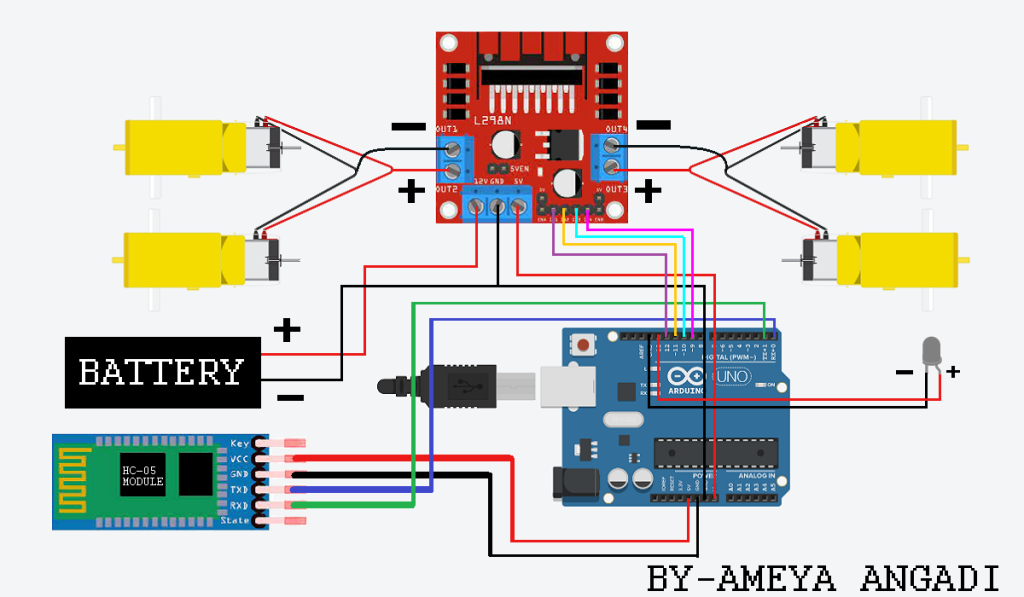
STEP 3: อัปโหลดโค้ด
หมายเหตุ: ควรถอด Bluetooth ออกจาก Arduino ก่อนอัปโหลดโค้ด
เพื่อป้องกันความเสียหายและข้อผิดพลาด
STEP 4: ติดตั้งไฟ LED (Optional)
สามารถเพิ่มไฟ LED สำหรับตกแต่งหรือใช้เป็นไฟหน้า
STEP 5: เลือกแหล่งจ่ายไฟ
สามารถใช้แบตเตอรี่หลายก้อนต่ออนุกรม เช่น 3 x 4V หรือใช้ 9V เสริม
หากมอเตอร์ทำงานไม่เต็มประสิทธิภาพ
ข้อควรระวัง
- ถ้ารถเชื่อมต่อได้แต่ไม่วิ่ง → แบตเตอรี่ไฟไม่พอ
- ตรวจสอบการต่อสายให้แน่น
- ตรวจสอบการจับคู่ Bluetooth
ชื่อ Bluetooth เริ่มต้น: HC-05 / HC-06
รหัสผ่าน: 0000 หรือ 1234
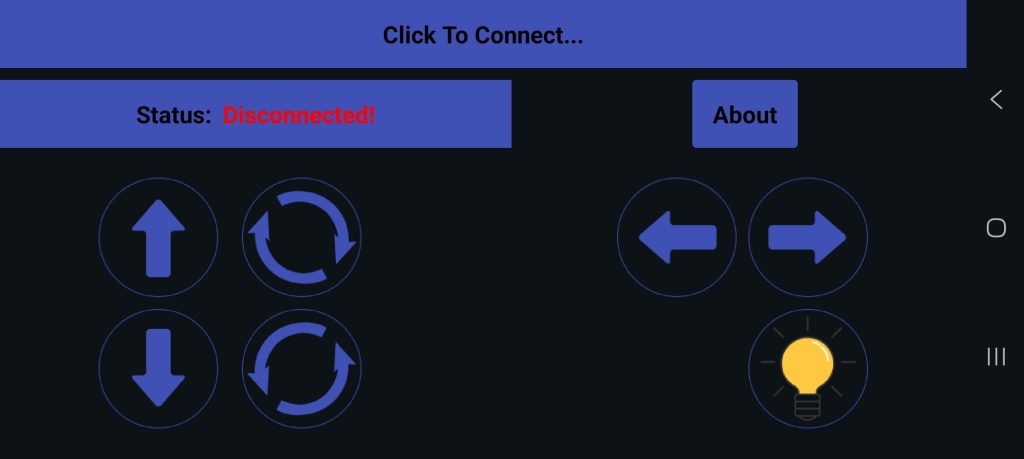
วิธีใช้งาน
- เปิดสวิตช์รถ
- เปิดแอปควบคุม Bluetooth
- เชื่อมต่อกับโมดูล
- กดปุ่มทิศทางเพื่อควบคุมรถ
โค้ดโปรแกรม Arduino
#define led1 13
#define in1 12
#define in2 11
#define in3 10
#define in4 9

void setup() {
  Serial.begin(9600);

  pinMode(in1, OUTPUT);
  pinMode(in2, OUTPUT);
  pinMode(in3, OUTPUT);
  pinMode(in4, OUTPUT);
  pinMode(led1, OUTPUT);
}

void loop() {
  if (Serial.available() > 0) {
    char inputvalue = Serial.read();

    if (inputvalue == 'F') { // Forward
      digitalWrite(in1, HIGH);
      digitalWrite(in2, LOW);
      digitalWrite(in3, HIGH);
      digitalWrite(in4, LOW);
    }
    else if (inputvalue == 'B') { // Backward
      digitalWrite(in1, LOW);
      digitalWrite(in2, HIGH);
      digitalWrite(in3, LOW);
      digitalWrite(in4, HIGH);
    }
    else if (inputvalue == 'R') { // Right
      digitalWrite(in1, LOW);
      digitalWrite(in2, LOW);
      digitalWrite(in3, HIGH);
      digitalWrite(in4, LOW);
    }
    else if (inputvalue == 'L') { // Left
      digitalWrite(in1, HIGH);
      digitalWrite(in2, LOW);
      digitalWrite(in3, LOW);
      digitalWrite(in4, LOW);
    }
    else if (inputvalue == 'S') { // Stop
      digitalWrite(in1, LOW);
      digitalWrite(in2, LOW);
      digitalWrite(in3, LOW);
      digitalWrite(in4, LOW);
    }
    else if (inputvalue == 'O') { // LED ON
      digitalWrite(led1, HIGH);
    }
    else if (inputvalue == 'o') { // LED OFF
      digitalWrite(led1, LOW);
    }
  }
}
สรุป
โปรเจครถบังคับผ่าน Bluetooth เป็นโปรเจคที่เหมาะสำหรับผู้เริ่มต้น
ช่วยให้เข้าใจการสื่อสารแบบไร้สาย และการควบคุมมอเตอร์
สามารถต่อยอดได้ เช่น:
- เพิ่มกล้อง (FPV Car)
- ควบคุมผ่าน WiFi
- เพิ่มระบบหลบสิ่งกีดขวาง
จากรถบังคับธรรมดา สู่ระบบ IoT เต็มรูปแบบได้ไม่ยาก
